|
|
|
|
|
|
|
QWERTY PC Keyboard |
|
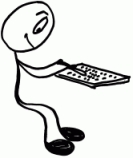
The QWERTY (PC)
keyboard has been around forever. Designed with two-handed typing in mind, the
keyboard is wider than it is tall. Most people have spent many hours using it and are
familiar with this layout:
Note: if you think the QWERTY layout was designed
to slow down the typist, see QWERTY rumor |
|
 |
|
|
|
|
|
|
|
Mobile Phone
Keypad |
|
Next came the
12-button phone keypad which was designed to enter numbers, not text. That's OK. As
long as we can dial 1-800-GO-PIZZA now and then. 1 2 3
4 5 6
7 8 9
* 0 # |
|
 |
|
|
|
|
|
|
|
Then comes
the internet. |
|
PC's,
email, web browsers, instant messaging, PDA's, lots of typing. People would like to
do some of these things on their mobile phones, except: Anyone who has used a mobile
phone keypad to type text knows that it makes a poor substitute for a PC keyboard.
|
|
@
|
|
|
|
|
|
|
|
QWERTY:
Too Wide
Square Peg.
Round Hole.
|
|
Designers tried
replacing the 12-button cell phone keypad with a tiny version of the familiar PC (QWERTY)
keyboard, but this does not work well. Buttons spaced less than 1 centimeter apart become
too tiny and too close together to type on comfortably. The QWERTY keyboard uses 10 buttons across the top row ( QWERTYUIOP
). Spacing these buttons 1 cm apart results in a cell phone that is about 10 cm (4
inches) wide. That is too wide to hold and operate comfortably with one hand, too wide to
fit easily into your pocket or purse, and too wide to talk on comfortably. |
|
 |
|
|
|
|
|
|
|
Alphabetical: Too Slow
Ready?
Unlearn everything.
|
|
Designers needed to come up with a high aspect-ratio
(taller-than-wide) keypad that was narrow enough to hold and operate with one hand.
Since ten buttons across (and therefore a
QWERTY layout) was no longer an option, designers ultimately used four to six buttons
across in alphabetically ordered rows. While these keypads are narrow enough for
single-hand operation, it is difficult to locate letters quickly on alphabetically ordered
keypad layouts because, alphabetically ordered keypad layouts have nothing in common with
the PC (QWERTY) keyboard layout you have spent so many hours using.
Your motor memory reflexes cause you to frequently stall
when searching for the next letter you want to type. It's not there. You are fighting your
instincts. |
|
|
|
|
|
|
| A |
B |
C |
D |
E |
| F |
G |
H |
I
|
J |
| K |
L |
M |
N |
O |
| P |
Q |
R |
S |
T |
| U |
V |
W |
X |
Y |
|
|
Z |
|
|
|
|
|
|
|
|
|
|
|
These were the dark ages of the mobile keypad.
|
|
All of the other pieces were in place, ready to complete the
evolution of the common cell phone into the ultimate smartphone, including bright
color displays, high-speed wireless data, and thousands of software applications.
We were waiting on what seemed to be an
impossibility - the speed and power of the 100+ button PC keyboard embodied in a keypad
the size of a matchbook.
|
|
 |
|
|
|
Then...
|
|
|
|
21st Century
|
|
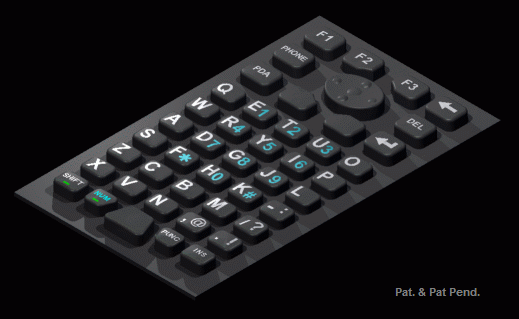
The
discovery of a single-hand operation keypad matrix that instantly improves typing speeds
by 200% to 300% causes mobile computing to flourish worldwide. The new layout affords
a pocket version of the full-sized PC keyboard - a comfortably slim, magically fast keypad
that is a joy to type on. |
|

|
|
|
|
|
|
|
|
|
|
 |
|
|

